A Mac app for Claude Code and Codex

Just the work.

Every Claude Code and Codex thread gets a VM of its own, set up and running before you look. No servers to keep, no installs to run, no ports to share: say what you want and review what comes back.

Coming soon for MacSee how it works →
Free on your Mac and your own servers. Ensemble VMs, from $20 a month, are coming
AgentsClaude CodeCodex
MachinesEnsemble VMsHetznerDigitalOceanany Linux box with KVMboat.devthis Mac
Around itGitHubLinearSentryDockerFirecracker
Isolation
1machine per thread

No worktrees, no clashes

A whole Linux machine each. Every thread can run Postgres and use port 3000, and none can break another.

Servers
0to look after

No servers, SSH or Tailscale

Ensemble VMs (coming) start from your project's image in seconds and stop when idle. Your own server works today.

Setup
0installs you run

The agent does the setup

It installs what the project needs, writes it into ensemble.toml and starts the dev server. You never type pnpm install.

Accounts
2logins, work and personal

Carries on when one runs out

Sign in with your work and your personal Claude account. When one hits its limit, new chats go to the other.

Threads

Six agents.
Six machines.
Zero collisions.

Each thread's machine has your repo checked out and your setup already done: an Ensemble VM, or a Firecracker microVM on your own server. Agents install what they want and break what they like; the worst case is a machine that was going to be thrown away anyway.

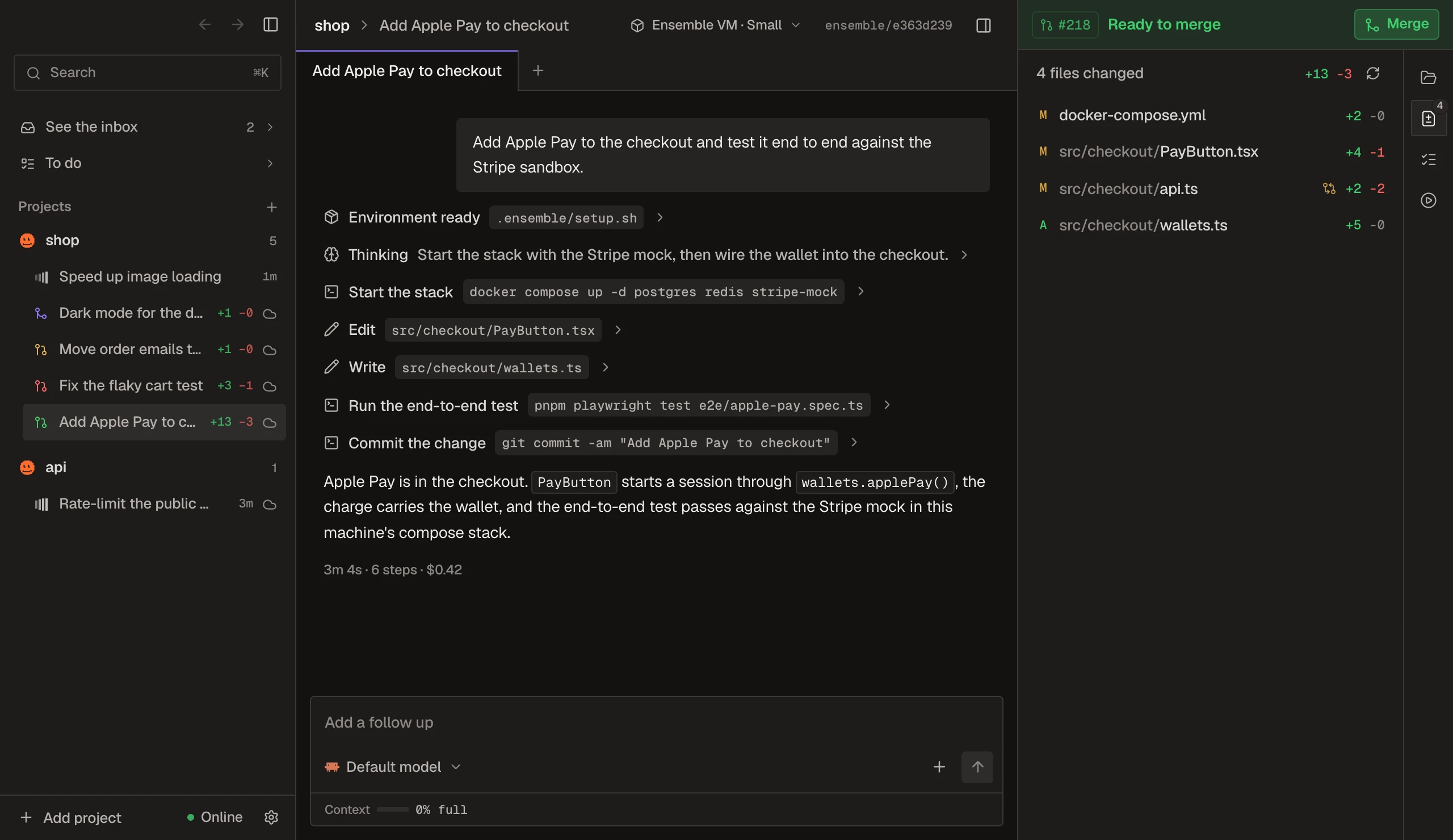
Ready to merge
Add Apple Pay to checkout
vm-07 · 301 MB
Working
Fix the flaky cart test
vm-08 · 1.2 GB
Working
Speed up image resizing
vm-09 · 940 MB
Merged
Migrate to Postgres 17
vm-04 · 230 MB
Needs you
Which queue for emails?
vm-10 · 256 MB
Paused
Dark mode for emails
vm-02 · 0 MB
In every thread

Everything but the work, handled.

Setup, servers, ports and logins used to be your job. Now they're not.

Add Apple Pay to checkoutlocalhost:3000/checkout
Checkout
Espresso beans, 1 kg€ 32.00
Shipping€ 4.95
Total€ 36.95
Pay
Pay with card
Dark mode for emailslocalhost:3000/emails
Your order is on its way
Track your order

You never run pnpm dev again

The agent starts what your project runs (its dev script, each compose service, the Procfile) inside the thread's machine. The preview sits in that machine's network, so localhost, cookies and OAuth redirects just work.

ensemble.toml
1[tools]
2node = "22"
3+python = "3.12"
4[packages]
5+apt = ["imagemagick"]
6[setup]
7checkout = "pnpm install --frozen-lockfile"
Next thread starts from an image with this already done

Environments that learn

Agents add what they install to the project's ensemble.toml, so the next thread starts ready on any machine. Nobody types pnpm install.

New chats go toMost roomIn order
Claude Code5 hours leftWeek left
WorkOut until 15:21
Personal66%48%

Work and personal accounts

Sign in with both and see what each has left. When one hits its limit, new chats carry on with the other.

Started a helper Write the e2e test
Started a helper thread Fix Safari's payment sheet
Waiting for helpers
2 helpers this agent started
Write the e2e testsame machineDone
Fix Safari's payment sheetown machine

Agents get helpers

An agent hands work to helpers it starts itself: a chat on the same machine, or a thread with its own machine and branch that becomes its own PR. It waits for them and carries on.

vm-07 · terminal
$ echo $GITHUB_TOKEN
ghu_ensQ7fK2mXa9LpR4tV8w… placeholder
$ git push origin ensemble/apple-pay
✓ pushed to github.com
The host swaps in the real token on the way to github.com, and only there.

Keys stay out of the machine

Agents, and any postinstall script they run, only ever see placeholders for your logins, tokens and secrets.

0500 MB1 GB1.5 GB01 min2 min3 min4 min5 min6 min7 min1.3 GB while it builds301 MB a minute later0 MB pausedawake in 1.3 s
Memory of one thread's machine
MomentMemory
1.3 GB while it builds1300 MB
301 MB a minute later301 MB
0 MB paused0 MB
awake in 1.3 s84 MB

Idle threads cost nothing

On your server a machine gives its memory back a minute after a turn and pauses after five idle minutes. An Ensemble VM stops when it's idle, so its hours only count while an agent works. Your next message wakes either where it left off.

Speed up image resizingshop · ensemble/image-resize
State
Working
Changes
+38 -9 · 3 files
Overlaps
Fix the flaky cart test · src/lib/image.ts
Runs on
Ensemble VM · Codex

Threads know about each other

Each agent is told what the others are changing, and the app marks the files two threads both touch.

LLinearIssues and cyclesInstalled
SSentryErrors and tracesInstalled
NNotionPages and docsInstall
VVercelDeployments and logsInstall
SSupabaseDatabases and tablesInstall
SStripePayments and docsInstall

Apps with one click

Linear, Sentry, Notion, Vercel and more, installed once for every machine. Their logins stay with the host; agents never see them.

#218Uncommitted changesCommit and push
#218Checks running
#2181 check failingFix errors
#218Ready to mergeMerge
#218Merged

From thread to merged

Commit, open the PR, watch checks, hand failures back to the agent, merge. The status bar says what's next.

PayButton.tsx⌘S Save
12export function PayButton({ total }) {
13 const wallet = useWallet();
14 if (!wallet.applePay) return <Card />;
15 return <ApplePay amount={total} />;
16}

Edit any file yourself

Open a file from the thread, change it, ⌘S. It's written straight to the thread's machine.

2 comments for ClaudeDiscardSend
21 const cart = useCart();
22-const total = cart.sum();
22+const total = cart.sum() * 1.21;

VAT depends on the country. Take it from the address, not a constant.

Not sent yet

Comment on the diff

Leave comments on the diff's lines, as on GitHub, then send them to the agent in one go. The PR's review comments show on their lines too.

Done: checkout keeps the cart in the URL, so a refresh doesn't lose it. Tests pass.

CopyFork ⌄1
/btw why keep it in the URL, not in storage?

Fork any reply

Try it another way from any reply: a new chat in the same thread, or a thread of its own with the code and conversation as they were. /btw asks on the side without touching the work.

Ask firstAutoFull access
Run this command?
pnpm db:reset --seed
Allow ↵Allow all commandsDeny esc

Ask first, or let it run

On your Mac, steps wait for your OK, a classifier stops the risky ones, or the agent has full access. In a VM it always has: the machine is the boundary.

Coming to iPhone

Your threads, in your pocket.

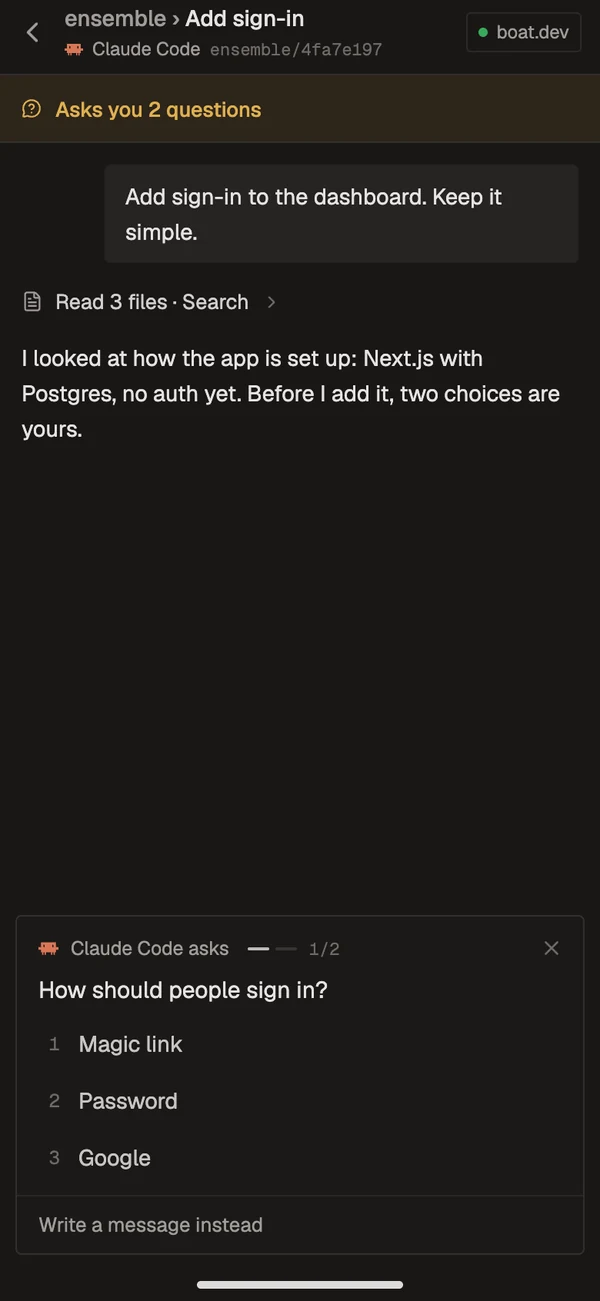
See what needs you, what's working and what's done, across every machine. Answer an agent's question with a tap, or send it a message, from anywhere.

  • Pair with a codeSettings shows a QR code; the phone scans it. No password.
  • Sealed to your machinesEvery request is signed by the phone and sealed to the machine it's for.
  • Every machine at onceThreads on Ensemble VMs, your servers and your Mac, in one inbox.
9:41The inbox: three threads that need you, then the rest under their projects, and the machines along the bottom
9:41A thread where the agent asks how people should sign in, with three numbered answers to tap
How it works

Your Mac is the window. The VMs do the work.

01 · your mac

The app

Projects, threads, diffs, PRs and checks. Online, a hub in Ensemble Cloud, or on your own server, keeps the threads going while it sleeps.

https
02 · ensemble cloud, or yours

The host

One program: ours in Ensemble Cloud, or installed for you on your server. It keeps your threads, their history and your keys, and starts their machines.

vm
03 · one per thread

A machine

An Ensemble VM, a Firecracker microVM on your server, or a box on your boat.dev account. Paused when idle, destroyed when archived; the branch and the conversation stay.

vm-07vm-08vm-09vm-04vm-10vm-02
Setup

Minutes, not a weekend.

No config files, no tokens to hunt for, no servers to set up.

  1. EnsembleThis Mac · ready
    01

    Download the app

    Start on your Mac straight away, with your own Claude or Codex login. No machine needed yet.

  2. Ensemble VMsServerboat.dev
    ✓ signed in✓ EU region✓ 20 at once
    02

    Pick where threads run

    A server of your own by its address and an SSH key, set up for you over port 22. Or Ensemble VMs, coming soon, with nothing to set up.

  3. Add Apple Pay to the checkout
    Opus 5.5Ensemble VMs↑
    03

    Start threads

    Pick a project from GitHub or a folder, say what you want, and start as many as you like.

Why Ensemble

Not your laptop.
Not their agent.
Yours, with a VM each.

Most agent apps squeeze every thread onto your laptop, or run their own agent on their machines with a config file per repo. Ensemble runs your Claude Code and Codex, on your own plans, each in a VM that sets itself up, with your keys kept out of it. On our machines, or on yours.

On your laptopworktrees, one machineIn their cloudhosted agentsEnsembleyour agents, a VM each
Threads at once~Until the fans spin up✓Many✓Up to 100 on Ensemble VMs; idle ones stop
Isolation✕Shared ports, databases and caches✓A container or VM each✓A whole Linux machine each: Docker, Postgres, port 3000
Setup~You run it, per worktree~A config file per repo✓The agent sets it up once; the next thread starts ready
Laptop closed✕Everything stops✓Keeps going✓Keeps going, on Ensemble VMs or your own server
Where your code lives✓Your Mac✕Their servers✓Ensemble VMs, or your own server or Mac: your choice
Your API keys and tokens✕Readable by the agent~Stored with them✓Never in the VM; filled in on the way out
Agents✓Whatever you install~Usually just theirs✓Claude Code and Codex, on your work and personal accounts
Previews~Port clashes between threads~Varies✓localhost just works, per thread
What it costs✓Your laptop~Per seat or per run✓Your agents' plans, plus Ensemble VMs from $20 a month (coming), or your own server
"On your laptop" and "In their cloud" describe the two common setups, not any one product.
Pricing

Free on your machines. Pay for ours.

The agents run on your own Claude and Codex plans. Ensemble VMs only count while an agent works.

Free

$0for good

Your Mac and your own machines.

  • Threads on your Mac, each in its own clone
  • Your Linux servers, a microVM per thread
  • Online mode on Ensemble Cloud: our hub, nothing to run
  • The iPhone app, when it's out

Max

Coming
$50a month

For a lot of agents at once.

  • Everything in Pro
  • 1,200 VM-hours a month
  • Every size, Large included
  • 100 threads running at once
SizeVMCountsPlans
Small2 vCPU, 4 GB1 VM-hour an hourPro, Max
Medium4 vCPU, 8 GB2 VM-hours an hourPro, Max
Large8 vCPU, 16 GB4 VM-hours an hourMax

Past the included hours it's $0.03 a VM-hour, billed with the next month, up to a limit you set; at the limit new turns wait and your other machines keep working. An idle thread's VM is stopped, and stopped VMs don't count.

FAQ

Questions, answered.

Where do threads run?

On Ensemble VMs once they launch, or on machines of your own. With Pro or Max every thread will get a VM of ours (Small is 2 vCPUs and 4 GB), started from your project's image in seconds and stopped when it's idle. You can also add a Linux server with KVM, where every thread gets a Firecracker microVM (we suggest 4 GB, $24 a month, for two threads building at once), or a boat.dev key, or run threads on your Mac as folders.

What does it cost?

Threads on your Mac or your own machines are free, and so is online mode on Ensemble Cloud. Ensemble VMs, when they launch, come with Pro, $20 a month for 300 VM-hours and 20 threads at once, or Max, $50 for 1,200 hours and 100 at once; past the hours it's $0.03 a VM-hour, up to a limit you set. The agents run on your own Claude and Codex plans.

Can I try it without a server?

Yes. On your Mac, threads run as local processes, each in its own clone of the project. They share your Mac, so ports can clash; pick Ensemble VMs or add a server when you want every thread in its own machine.

Do threads keep going when my Mac sleeps?

On Ensemble VMs, and on your own server in online mode, yes: the hub runs somewhere that's always on, and your phone can reach it. A thread on your Mac stops when it sleeps, but it can move: tell the agent you're off and it offers to carry on in an Ensemble VM, its work and conversation with it.

Can I use my work and personal Claude accounts?

Yes, both. Sign in with each, and the app shows what each has left this week and in the last five hours. When one hits its limit, new chats go to the other. Codex works the same way.

Does my code pass through you?

Only on Ensemble Cloud and Ensemble VMs. They run the hub and the machines for you, so they hold what they run (code, transcripts, the agents' logins), as any hosted agent product does. Offline, or with the hub on your own server, the app talks to your machines directly, and your code, conversations and keys stay on them and your Mac.

Which agents does it run?

Claude Code and Codex, with your own logins or API keys.

Can an agent read my tokens?

No. A thread's machine gets placeholders for your Claude and Codex logins (a ChatGPT sign-in too), your GitHub token and your project's secrets; the host fills in the real value only on requests to the service it belongs to.

Is there an iPhone app?

It's on its way, for online mode. It pairs through a QR code and shows every thread that needs you, across all your machines; you answer questions, send messages and start threads from it. Every request is signed by your phone and sealed to the machine it's for. Notifications come next.

What is Ensemble Cloud?

Your Ensemble account, and our hub, so you don't run one: online mode with nothing to set up, the phone included, free. On Pro and Max it runs Ensemble VMs too, a VM per thread on our machines.

Do I need GitHub?

For Ensemble VMs, yes: they get your code from GitHub. Elsewhere a project can be any git remote or a folder on your Mac. With GitHub connected you also get pull requests, checks and merging inside the app.

What happens when I archive a thread?

Its machine is destroyed; its branch, uncommitted work and conversation are kept. Reopen it and it gets a new machine with all of that back.
Start on your Mac.
Give every thread a VM when you outgrow it.

Coming soon for MacHow it works →